
Download Reflexion – Eye Care, Break Scheduler, Productivity Tool
Overview
Reflexion is a compact, user-friendly mobile application designed to promote healthier computer usage habits by scheduling regular breaks. Its primary purpose is to mitigate eye strain and support long-term visual wellness, especially for individuals who spend extended periods in front of digital screens. The app is particularly beneficial for office workers, remote professionals, students, and anyone engaged in prolonged computer-based tasks. By prompting users to rest their eyes every two hours—based on a customizable start time—Reflexion fosters a disciplined routine that aligns with recommendations from healthcare professionals.
Reflexion addresses a growing concern in the digital age: the physical toll of screen dependency. Extended screen exposure without adequate rest can lead to dry eyes, headaches, and reduced focus. This app offers a simple, automated solution by integrating break reminders directly into daily workflows.
Its minimalistic approach ensures it doesn’t disrupt productivity while reinforcing healthy habits. Although the developer did not provide additional background information, the app’s longevity—first released in 2007—suggests a stable, proven track record in the productivity and wellness space. Real-world use cases include remote work environments, study sessions, and creative workflows where sustained concentration is required.
Key Features & Functionality
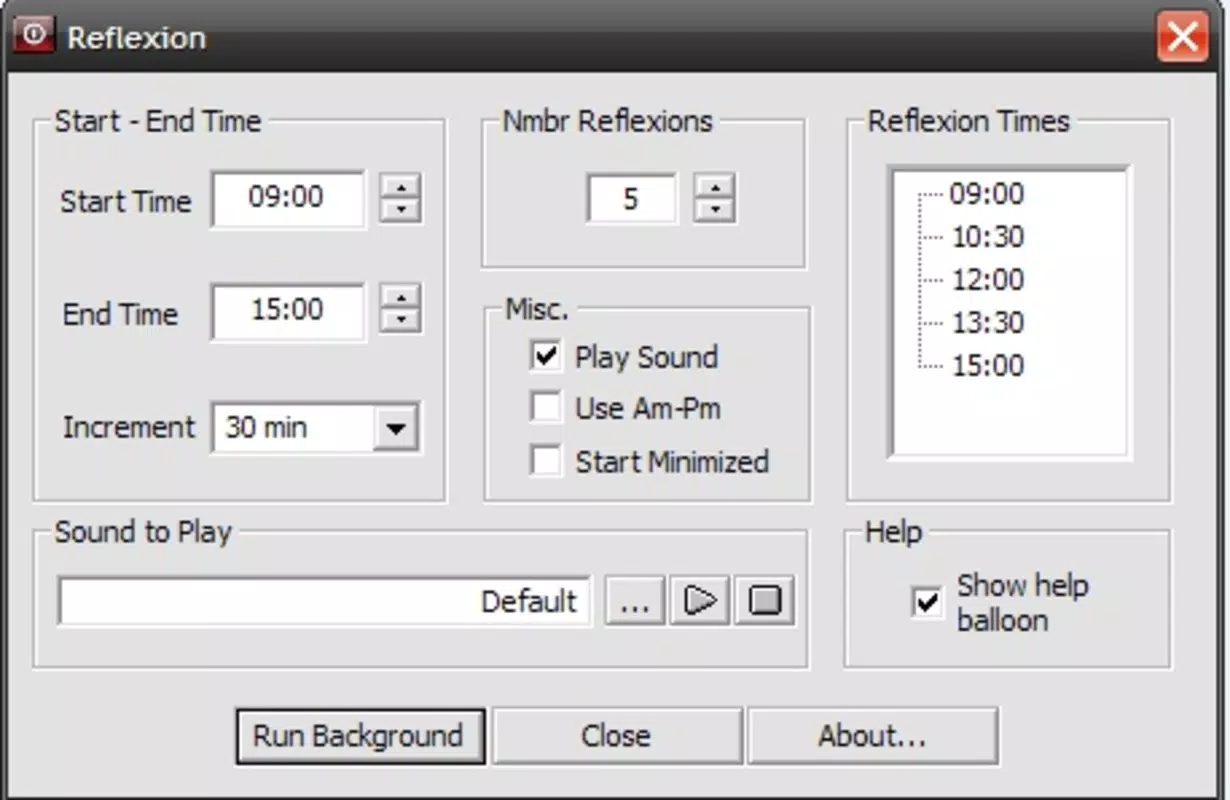
- Customizable Break Scheduler: Users can input their starting time, and Reflexion calculates break intervals automatically. This feature ensures that rest periods align with individual schedules, whether someone begins work at 8 a.m. or 2 p.m.
- Sound Alerts for Breaks: The app includes a default bell sound, but users may replace it with any MP3 or WAV file. This flexibility allows personalization based on user preference, such as using a calming chime or a gentle tone.
- Visual Notifications: A non-intrusive text balloon appears on screen when a break is due. This is ideal for quiet environments or users who prefer visual cues over sound.
- Eye Health Focus: Endorsed by healthcare professionals, Reflexion emphasizes the importance of periodic eye rest. Regular breaks help reduce digital eye strain and support long-term ocular wellness.
- User-Friendly Interface: The app features a simple, intuitive layout that requires no technical knowledge. Setup is quick and accessible to users of all experience levels.
For example, a student preparing for exams can set the app to begin at 9 a.m., ensuring they take a break every two hours. A remote worker can use the visual alert to step away from their desk without disturbing colleagues. The app’s ability to adapt to individual routines enhances its practical value across diverse use cases.
Interface, UX & Performance
Reflexion features a clean, minimalist interface focused on functionality over ornamentation. The layout prioritizes ease of use, with clear input fields for setting the start time and straightforward access to notification preferences. Navigation is intuitive, requiring minimal interaction to configure and activate the break schedule. The app avoids clutter, ensuring users can set up reminders quickly without confusion.
Although the developer did not list formal performance metrics, the app’s lightweight design suggests it operates efficiently on a range of devices. Its small footprint likely contributes to low battery consumption and minimal system resource usage. Users can expect consistent responsiveness across different screen sizes and device categories. The stability of the app is implied by its long-standing presence in the market, though no specific data on crashes or freezes was provided. The visual and audio alerts appear reliably when triggered, indicating dependable operation under normal conditions.
Platform Compatibility & Technical Requirements
Reflexion is available on Android and iOS platforms, supporting mobile devices that meet standard operating system requirements. The app’s file size is compact, reflecting its minimalistic design and focus on core functionality. Specific version requirements were not listed, and the developer did not disclose minimum OS versions or hardware specifications. Compatibility information was not fully disclosed, so users are advised to check their device’s system settings for updates before installation. The app’s long release history suggests broad compatibility with current and older devices, though this cannot be confirmed without official documentation.
Pros and Cons
Pros
- Simple, intuitive interface suitable for all users
- Customizable break intervals based on user-defined start times
- Supports both sound and visual break alerts
- Endorsed by healthcare professionals for eye health
- Lightweight and efficient performance
Cons
- Specific technical requirements not disclosed
- No visible update history or changelog provided
- Developer background not publicly available
- Limited customization beyond sound and visual alerts
- Compatibility with older devices not confirmed
FAQ
Is Reflexion safe to use on my smartphone?
Yes, Reflexion is designed as a lightweight utility app that does not access sensitive data or require high-level permissions. It operates securely within standard app permissions.
Can I update Reflexion on my device?
Updates are available through official app stores. Users should ensure their device’s operating system is up to date to receive the latest version.
Does Reflexion work on both Android and iOS?
Yes, the app is compatible with both Android and iOS platforms, though specific OS version requirements were not listed.
How does Reflexion help with eye strain?
By scheduling regular breaks every two hours, Reflexion encourages users to rest their eyes, reducing the risk of digital eye strain and supporting long-term visual health.
Can I use Reflexion without sound alerts?
Yes, users can choose to rely solely on visual notifications. The app supports silent operation with text balloon alerts for break reminders.
Final Thoughts
Reflexion stands out as a focused, reliable tool for anyone seeking to maintain healthy computer habits. Its core strength lies in its simplicity and effectiveness—offering essential break scheduling without unnecessary complexity. While it lacks advanced customization or modern interface polish, its proven track record and professional endorsement make it a trustworthy choice for eye care.
The app is ideal for users who value productivity without sacrificing health. For those looking to reduce screen fatigue and support visual wellness, Reflexion delivers a practical, low-effort solution. Download Reflexion now.


